
💡
Live Hints Matrix
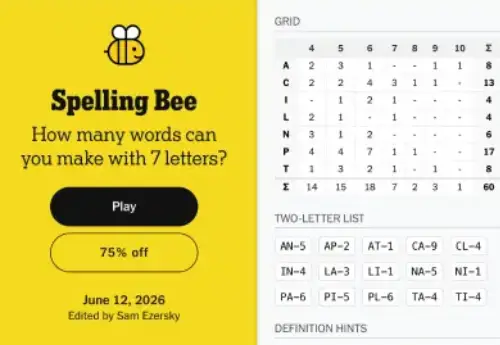
See a two-letter breakdown and word-count-by-length grid directly on the NYT Spelling Bee page. Get just enough information to figure out words yourself.
Get personalized, progressive Spelling Bee hints on the official NYT page — two-letter lists, definitions, and answer reveals that escalate only when you ask. No tab switching. No spoilers you do not want.
Explore the features that make Spelling Bee Buddy the ultimate companion tool.
See a two-letter breakdown and word-count-by-length grid directly on the NYT Spelling Bee page. Get just enough information to figure out words yourself.
Hover over any word to see its definition. Great for learning the obscure words that keep appearing in Spelling Bee.
Choose your spoiler level: show 2-letter hints only, reveal words by length, or see full answers. You're in complete control of your experience.
Get gentle nudges toward the pangram without seeing the answer. The most satisfying way to find that elusive 7-letter word.
See exactly how many points you need for each rank, from Beginner all the way to Queen Bee. Updated in real-time as you find words.
Blends seamlessly with the NYT Spelling Bee interface. No clutter, no popups, no ads. Just helpful information where you need it.
Getting started is quick and requires no registration.
Click "Add to Chrome" above. The extension installs in seconds and requires no account or special permissions.
Navigate to nytimes.com/puzzles/spelling-bee as usual. Buddy automatically detects the page and adds the hints panel.
Click the Buddy icon to choose your hint level. Start with two-letter hints and increase the helper level as needed.

See how Spelling Bee Buddy stacks up against other solving methods.
| Method | Switch Tabs | Spoiler Risk | In-Game Help | Speed |
|---|---|---|---|---|
| Spelling Bee Buddy | ❌ Never | ✅ Controlled | ✅ Native panel | ⚡ Instant |
| Tab-switch to sbeehub.com | ✅ Constantly | ⚠️ Full spoilers | ❌ Separate page | Slow |
| Tab-switch to sbsolver.com | ✅ Constantly | ⚠️ Full spoilers | ❌ Separate page | Slow |
| Solve entirely alone | ❌ Never | ✅ None | ❌ None | Very Slow |
Read feedback from our active daily players community.
"Game changer. I used to have 3 tabs open — NYT, sbsolver, and a dictionary. Now I just have one. The progressive hints are perfect."
"The definitions feature alone is worth it. I've learned so many new words that keep showing up in the puzzle. My vocabulary has improved significantly."
"I was skeptical but installed it anyway. Uninstalled it after a week... because I don't need it anymore! The word patterns I learned stuck with me."
Have questions? We have compiled answers to common questions about Spelling Bee Buddy.
Disclaimer: Spelling Bee Hub is an independent fan resource and is not affiliated with The New York Times Company. NYT Spelling Bee is a trademark of The New York Times Company. The Spelling Bee Buddy helper Chrome extension is an open-source companion project.
Master the Spelling Bee with our full suite of premium tools designed to help you reach Genius rank faster.